




The best AI agent observability and analytics tools in 2027 for engineering teams are Harness, Waydev, Hivel, GitClear, DX, Oobeya and Port. They watch the coding agents your engineers run, such as Claude Code, Cursor, and Copilot agents, and report what those agents cost, what they shipped, and whether it held up. That is a different job from tracing an agent you build into your own product. Six signals matter: token spend, agent activity, merged output, quality, waste, and governance. We ranked Hivel because it ties agent spend to merged work and flags recoverable waste.
What is AI agent observability, and which kind do you need?
AI agent observability means seeing what an AI agent did, what it cost, and what came of it. The term covers two different needs, and buying the wrong kind is the most common mistake.
If you are building an agent, look at tracing and evaluation tools such as LangSmith, Langfuse, Arize Phoenix, or Datadog's LLM observability. This article covers the second kind, because that is where engineering budgets are now going. The DORA 2025 report found AI use at 90% of respondents, with AI adoption positively related to throughput and negatively related to stability. Agents raise both effects.
Which six signals should you observe for coding agents?
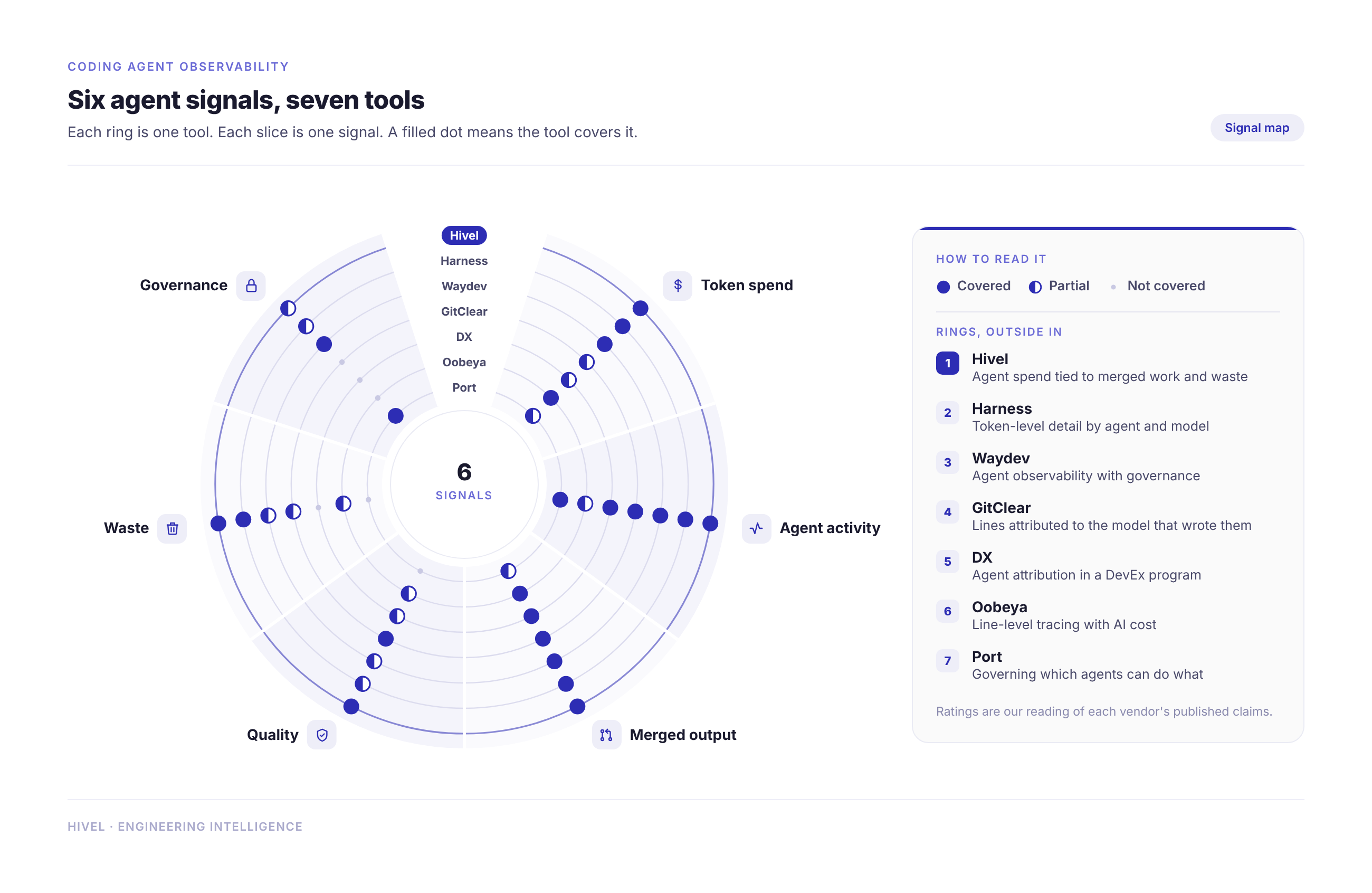
How do the seven tools compare on the six signals?
The seven tools, in order of fit
1. Hivel: best for tying agent spend to merged work and recoverable waste
We built Hivel to answer the question a token dashboard can't: what did the agent's spend produce? Our SURGE framework starts with Spend, which shows AI cost by tool, model and team, including token usage. Utilization shows who actually uses each seat across Copilot, Cursor and Claude Code. Gains classifies AI-generated code from merged pull request diffs, with no IDE plugin, and reports AI-assisted PRs merged and cost per PR. Efficiency shows whether rework and delivery moved.
Recovery is the part most tools skip. It attaches a recoverable-dollar figure to four waste patterns: premium models used for low-value work, background agents still calling APIs after the task is dead, overlapping licenses on one seat, and contracts committed beyond actual use. Our alerts notify you through Slack or email when a threshold is crossed. Growth is $20 per contributor per month billed annually, and Enterprise, which includes AI spend tracking, is custom. Where others fit better: we don't trace an agent's individual steps or enforce agent permissions. For step-level traces of agents you build, use a tracing tool, and for agent policy, look at Port or Waydev.
2. Harness: best for token-level detail by agent and model
Harness AI DLC Insights reports tokens consumed by developer, team, agent, and model, AI-authored code at the commit level, AI-assisted pull requests, wasted spend and total spend per pull request, alongside DORA metrics. It names power users and unused seats, and integrates with Claude, Cursor, Copilot, and Windsurf. It can be tried for free with no credit card, and paid plans are quoted. G2 shows 4.6 from 335 reviews for Harness Platform. It fits best if you already run Harness for delivery.
3. Waydev: best for agent observability with governance
Waydev offers Agent Observability and AI Governance next to AI Adoption, AI Impact, and AI ROI, and its own model runs in a controlled deployment without sending inference requests to external model APIs. Plans are custom quotes, and G2 shows 4.7 from 62 reviews. It fits regulated teams that want observation and policy in one tool.
4. GitClear: best for attributing lines of code to the model that wrote them
GitClear attributes every line to the model that wrote it across Claude, Cursor, Copilot, Codex, Augment, and Gemini, by cross-referencing Git history with vendor AI usage APIs and agent telemetry hooks. It scores durable output against rework, defects, and review time. Starter is free, and paid plans run from $14.95 to $34.95 per contributor per month billed annually. It is code-centered, so pair it with a spend view.
5. DX: best for agent attribution inside a developer experience program
DX tracks AI-generated code by commit, pull request, team, agent, and repository, next to its survey data. Atlassian completed its acquisition in November 2025, and pricing is quote-based. It fits teams that want to know how developers feel about working with agents as well as what the agents produce.
6. Oobeya: best for line-level tracing with AI cost
Oobeya traces AI-generated code line by line and monitors AI cost for Claude, Codex, and GitHub Copilot. G2 shows 4.9 from 31 reviews. Pricing is tailored, so get a written quote, and ask for references given the small review base.
7. Port: best for governing which agents can do what
Port positions itself as an agentic SDLC platform with agent management, governance, a context layer, and workflows, and says it measures the ROI of AI in engineering. Free covers five seats, Basic is $30, and Standard is $48 per seat per month, and Enterprise is custom. G2 shows 4.4 from 41 reviews. It is the pick when the main need is control over agents, with analytics second.
How do you start observing coding agents in 30 days?
- Pick one team and one agent. A narrow start makes the numbers readable.
- Capture spend by model. Record tokens and cost per agent, model, and developer.
- Link spend to merged work. Count AI-assisted pull requests merged and cost per merged PR.
- Add a quality guardrail. Track rework and change fail rate for agent-written code.
- Set one alert. A spend or rework threshold is enough to catch a runaway agent.
- Review after four weeks. Keep, change, or stop the agent based on cost against merged output.
For the wider picture, see our list of the best AI code analytics tools and our guide to six AI metrics that prove ROI to your board.
Want to know what your coding agents cost and what they shipped? We run a free, read-only AI ROI report on your team data and benchmark it against 1,000+ engineering teams already on the platform. Book a demo or talk to an expert about agent spend.
